> For the complete documentation index, see [llms.txt](https://docs.tiny.plus/llms.txt). Markdown versions of documentation pages are available by appending `.md` to page URLs; this page is available as [Markdown](https://docs.tiny.plus/guides/everyday/enquiries.md).
# Enquiries
Capture new enquiries from your website or by hand, work them through a short pipeline, and turn the good ones into projects.
An enquiry is a first approach: someone has called, emailed or filled in the form on your website, and you don't yet know whether it will become a project. Enquiries keep those approaches in one place, with who's following up and by when, until each one is converted into a project or closed.
{% hint style="info" %}
Enquiries are switched on by an Account Admin under [Account Settings -> Enquiries](https://crm.tiny.plus/account/enquiries). Until then, Enquiries doesn't appear in the menu.
{% endhint %}
## The Enquiries page
**Enquiries** in the main menu has three views: **Pipeline**, **Table** and **Reports**.
* **Pipeline** is a column for each open phase, with a card for each enquiry. Drag a card to the next column as the enquiry moves along. **Showing** switches between your own enquiries and the firm's; sort by name, last updated or date added, and filter by team member or tag. Closed enquiries aren't on the board.
* **Table** lists enquiries in rows, open ones to begin with, with the usual filters and a **Filter with AI** box.
* **Reports** lists the reports about enquiries, and lets a Reports Admin make one.
## An enquiry's page
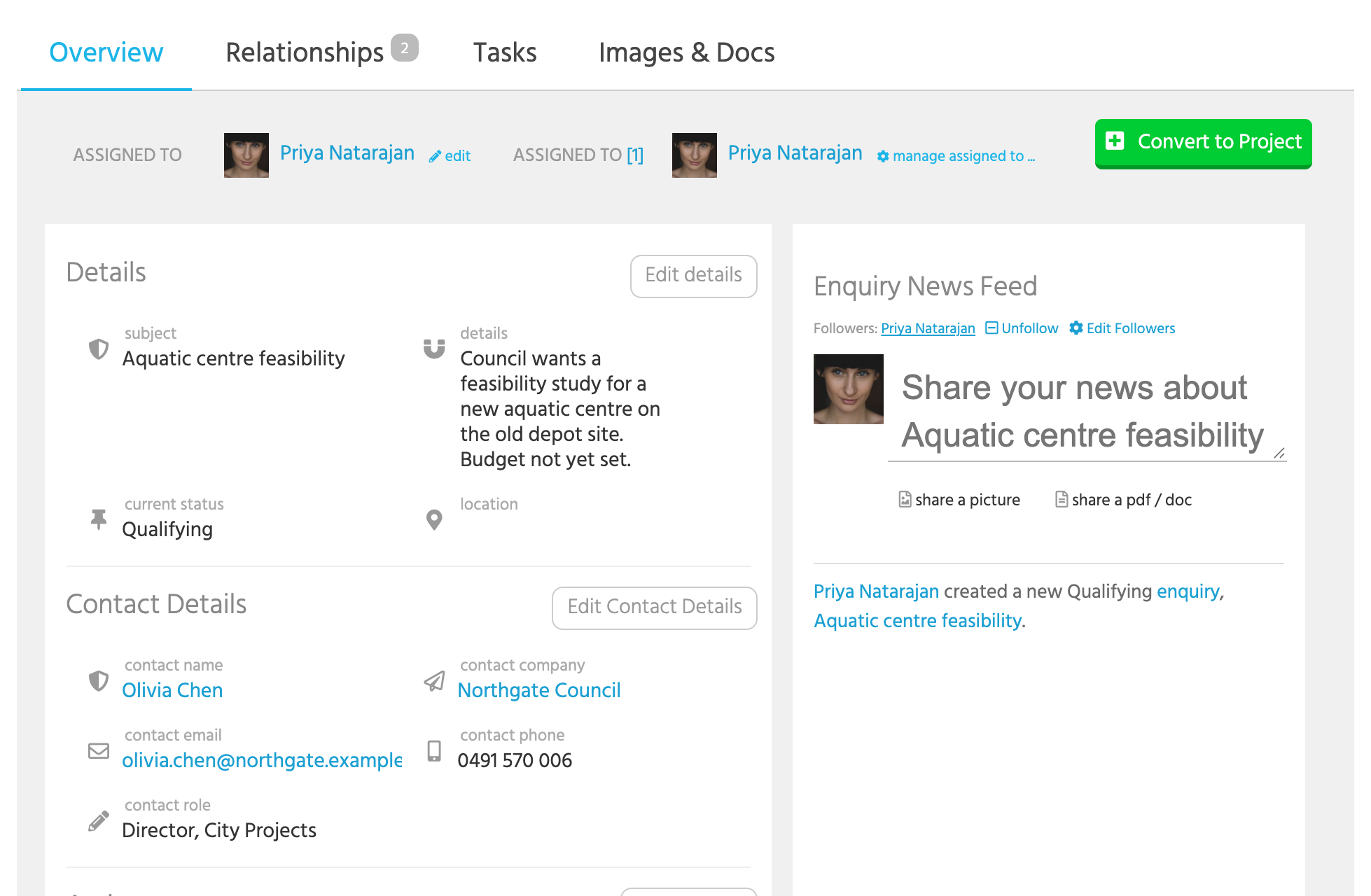
An enquiry has a **Subject** and **Details**, a **Location**, and the **Contact Details** you were given: name, company, email, phone and role. The contact and company can be typed as text, before they exist in tiny+, or picked from your records. Under **Actions** are **Follow-up by**, which starts three days ahead, and your **Notes**.
Like every record it has a news feed, followers, tasks in its **Tasks** tab, and images and documents.
* **add**, beside a contact name that was typed in, saves that person as a contact in tiny+ and links them.
* **Convert to Project** opens a new project with the subject, company, address, description and owner filled in. When you save it, the project is linked to the enquiry and to the contact, a contact is created from the details if there isn't one yet, and the enquiry is closed as *Converted*.
* To close an enquiry without a project, set its **Current Status** to a closed phase, such as *Declined*. It leaves the pipeline and shows under closed enquiries.
## Phases
An enquiry is either **Open** or **Closed**, and your Account Admin can split each into phases under Account Settings -> Enquiries. Switching enquiries on creates a starting set: *New*, *Follow-up* and *On-hold* under Open, and *Converted*, *Declined* and *Cancelled* under Closed. Each open phase is a column on the pipeline.
A new enquiry starts in the first open phase. Converting one puts it in the first closed phase.
## Enquiries from your website
Your firm can take enquiries straight from its website. An Account Admin sets up the form under Account Settings -> Enquiries, giving it a title, a note to show above the fields, and the fields to include: subject, details, and the contact's name, email, phone, company and role. Every field on the form is required.
The form has an address of its own. Link to it from your website, or embed it in a page as a frame, where it takes on a plainer look. Each submission becomes an enquiry in the first open phase, assigned to the person who made the form and followed by them, with a follow-up two working days ahead. A reCAPTCHA keeps robots out, and the same address can't submit the same form twice within five minutes.
The person the form is assigned to is notified when a web enquiry arrives, by email too unless their [notification settings](/guides/everyday/notifications-and-apps.md) say otherwise, and sees it on the pipeline and the feed. An [automated action](/guides/reports/automated-actions.md) can email someone else or create a task when an enquiry is created.
{% hint style="warning" %}
A form that has been set to *Disabled* still accepts submissions at its address. To stop taking enquiries from a form, delete it.
{% endhint %}
## Enquiries in reports
The **New Business** [scheduled report](/guides/reports/scheduled-reports.md) emails new enquiries, how they came in, which became projects, and the open enquiries due a follow-up or assigned to nobody. The **Enquiries** section can be added to other reports too.
## Who can do what
* Everyone can add enquiries, work the ones they're assigned to, and convert them.
* Records Admins can edit and delete any enquiry.
* Account Admins switch enquiries on, set up the phases and make the website form.