> For the complete documentation index, see [llms.txt](https://docs.tiny.plus/llms.txt). Markdown versions of documentation pages are available by appending `.md` to page URLs; this page is available as [Markdown](https://docs.tiny.plus/guides/everyday/meetings-and-tasks.md).
# Meetings + Tasks
The things to do and the people to see: tasks with due dates, meetings with contacts, a calendar of both, and a reminder on the morning a task falls due.
A **task** is something to do by a date: send the fee proposal, chase the purchase order, call Olivia. A **meeting** is a time with people: a site walk, a design review, lunch with a client. Both hang off a project, a company or a contact, so that the record shows what's planned and what happened.
**Meetings + Tasks** in the main menu has four views: **Calendar**, **Tasks**, **Meetings** and **Reports**. Each project, company and contact also shows its own, in its **Meetings & Tasks** panel.
## On a record's page
A project's page and a company's page have a **Meetings & Tasks** panel. On a contact's page it's a tab, and the tab counts what's still to do.
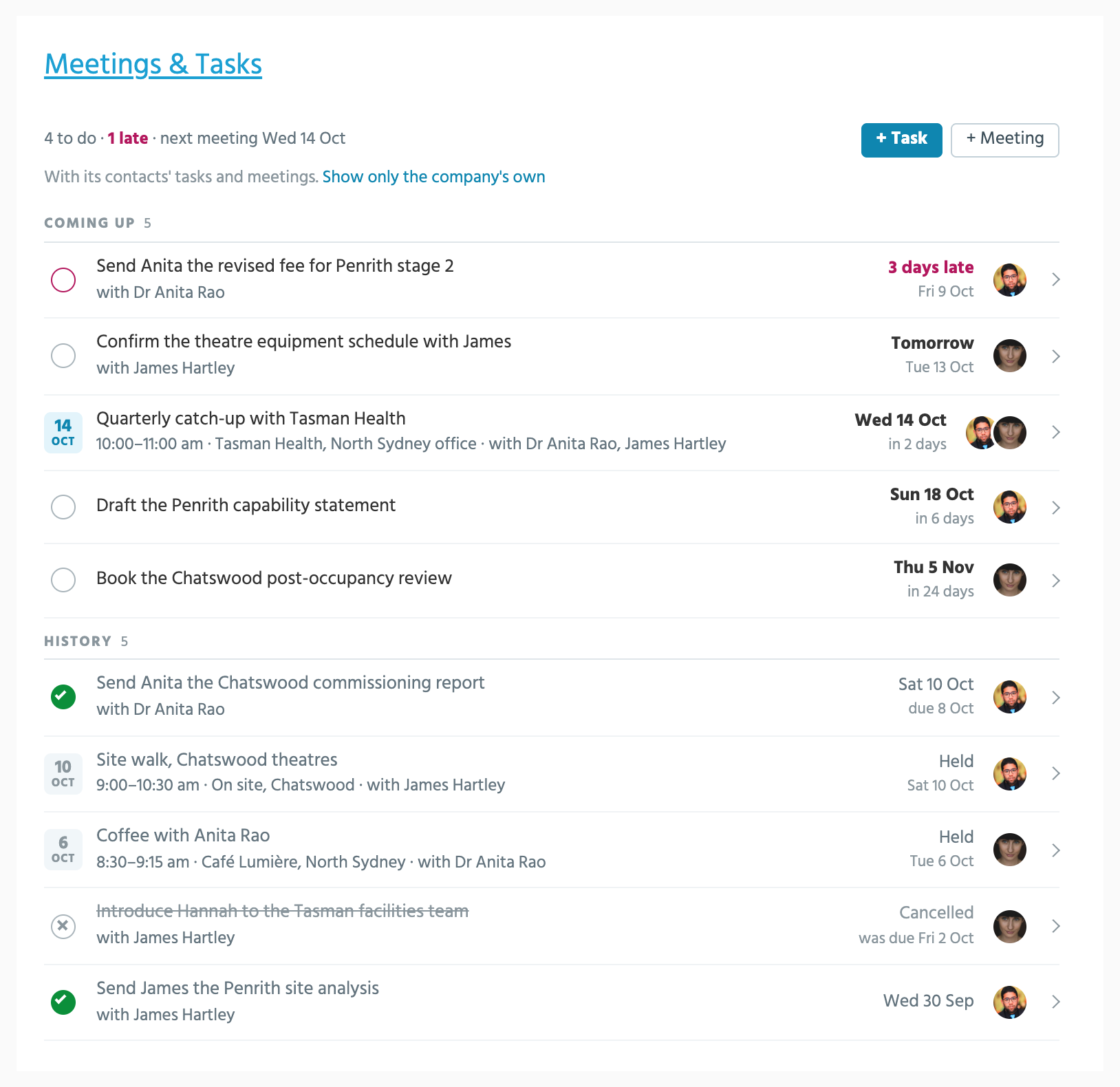
The top line says how many tasks are still to do, how many are late, and when the next meeting is. **Coming up** lists the open tasks and planned meetings, late ones first, then by day. **History** lists what's been done, held or cancelled, newest first: five, then twenty more each time you click **Show more**.
Each row says when: *3 days late*, *Tomorrow*, or the day and how far off it is. A meeting has its time and place. Every row says who it's with, and on a contact's tab, a task filed on their company says so: *on Tasman Health*.
A company's panel takes in its current contacts' tasks and meetings as well as its own, so a coffee with Dr Rao shows on Tasman Health's page. **Show only the company's own** switches that off for you, until you switch it back.
### Acting on a row
Tick a task to complete it. A line under Coming up says what happened, with **Undo** for a few seconds.
Click a row to open it.
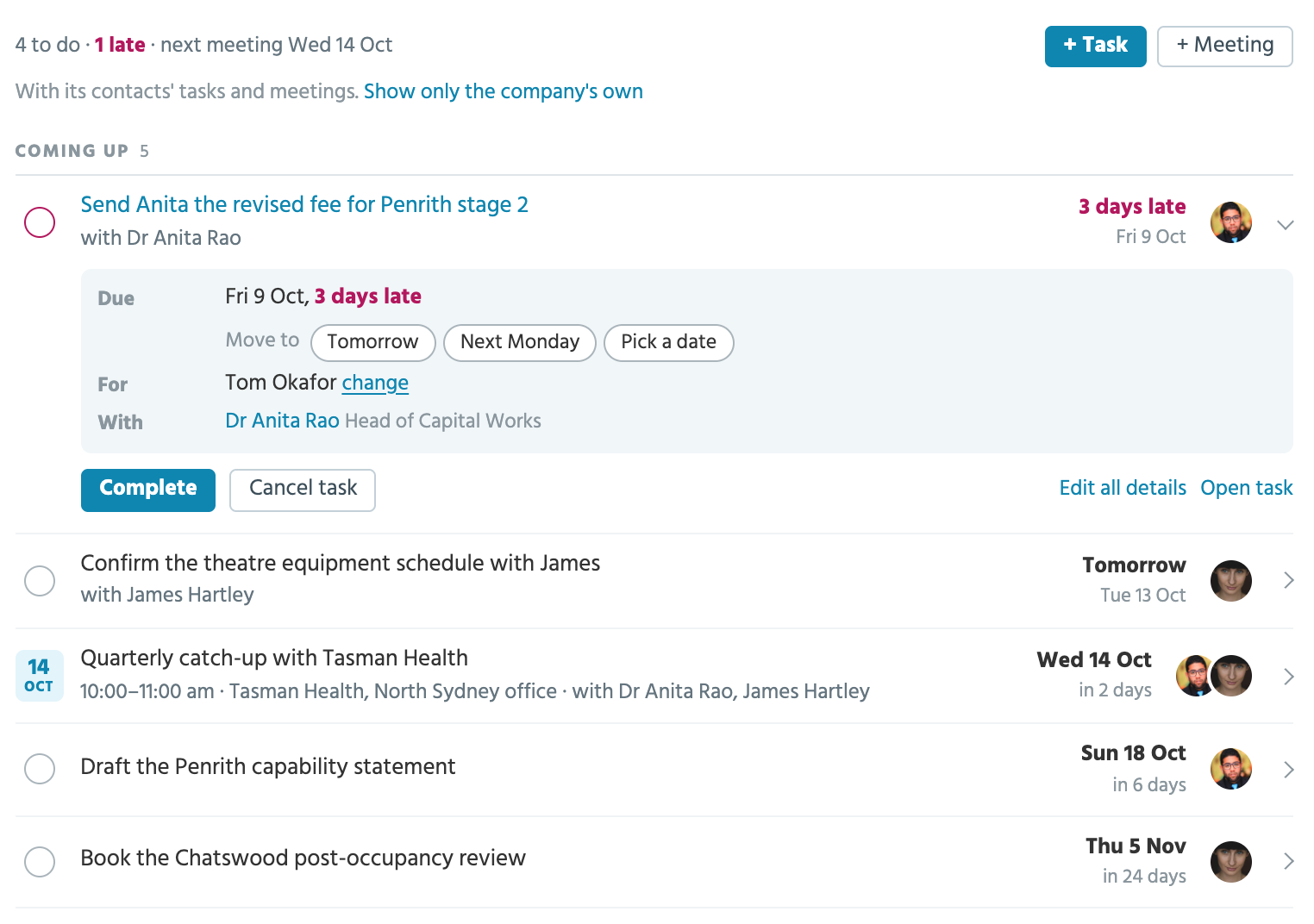
An open task shows when it's due, who it's for, who it's with and its notes. From there:
* **Move to** gives it a new date: **Tomorrow**, **Next Monday**, a week on, or **Pick a date**.
* **change**, beside who it's for, hands it to someone else.
* **Complete** ticks it off, and **Cancel task** keeps it on record as not done, after asking. A completed task in History has **Reopen**.
* **Edit all details** and **Open task** go to the task itself.
An open meeting shows when and where it is, who it's with, and who from your firm is going, with its owner marked. **Move** gives it a new day and time and keeps its length, **Cancel meeting** asks first, and once its time has come, **Mark as held** marks it held.
A follow-up booked by a [relationship plan](/guides/everyday/relationship-plans.md) goes through its plan: its tick and **Log it** open the plan's log, and **Move to** and **Skip** move or skip it in the plan. These have no Undo.
If a task or meeting isn't yours to change, its row says who can.
### Adding
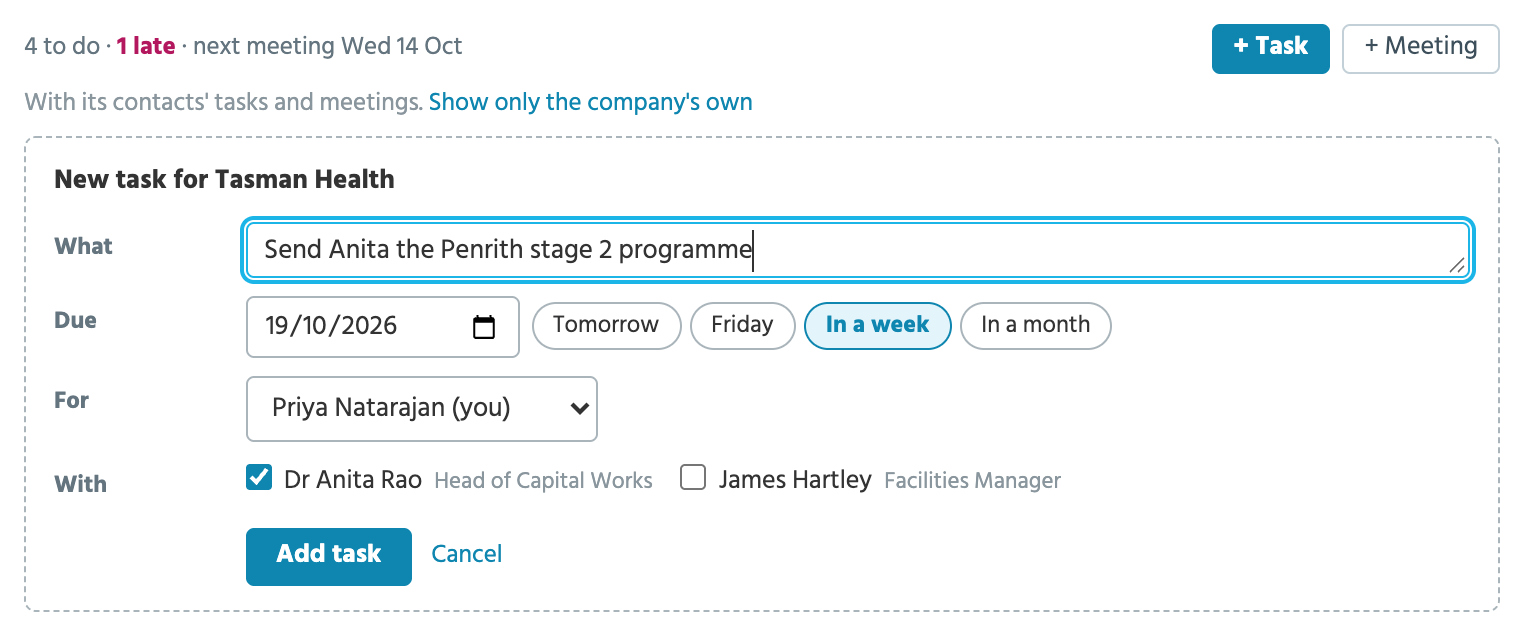
**+ Task** and **+ Meeting** open a short form in the panel, started from the page you're on.
* A task is for you and due in a week, with **Tomorrow**, **Friday**, **In a week** and **In a month** a click away.
* **With** offers the record's people: a company's current contacts, a project's contacts and its companies' current contacts, and on a contact's tab, that contact, ticked already. Whoever you tick has it on their page too.
* A meeting starts at the next whole hour and runs for one. Move the start and the end moves with it.
* On a project, a meeting starts with the project's team in **Ours**.
* A meeting whose time has passed is saved as held, and the button says **Save as held**.
The rest of the form, such as a meeting's notes, your categories and your own fields, is under **More fields**. The task form is **Add New Task (Embedded)** in the [Form Designer](/guides/admin/fields-forms-and-panels.md#form-designer), so your Account Admin can choose what it asks for.
### Enquiries, events, sites and team members
Enquiry, event, site and team member pages have a **Tasks** tab, with the same list and **+ Task**. They have tasks only, because a meeting is with a company, a contact or a project. A task added there is linked to the record. On a team member's page it's for them, and the tab lists the tasks they're on.
## The calendar
The calendar shows your own tasks and meetings by month or as a list. Overdue tasks are red, completed ones grey with a tick, and held meetings dark. Click a day to add a meeting on it. Account Admins and Records Admins can open **Show calendar for all team members** to see everyone's, with each item's owner beside it.
## Tasks
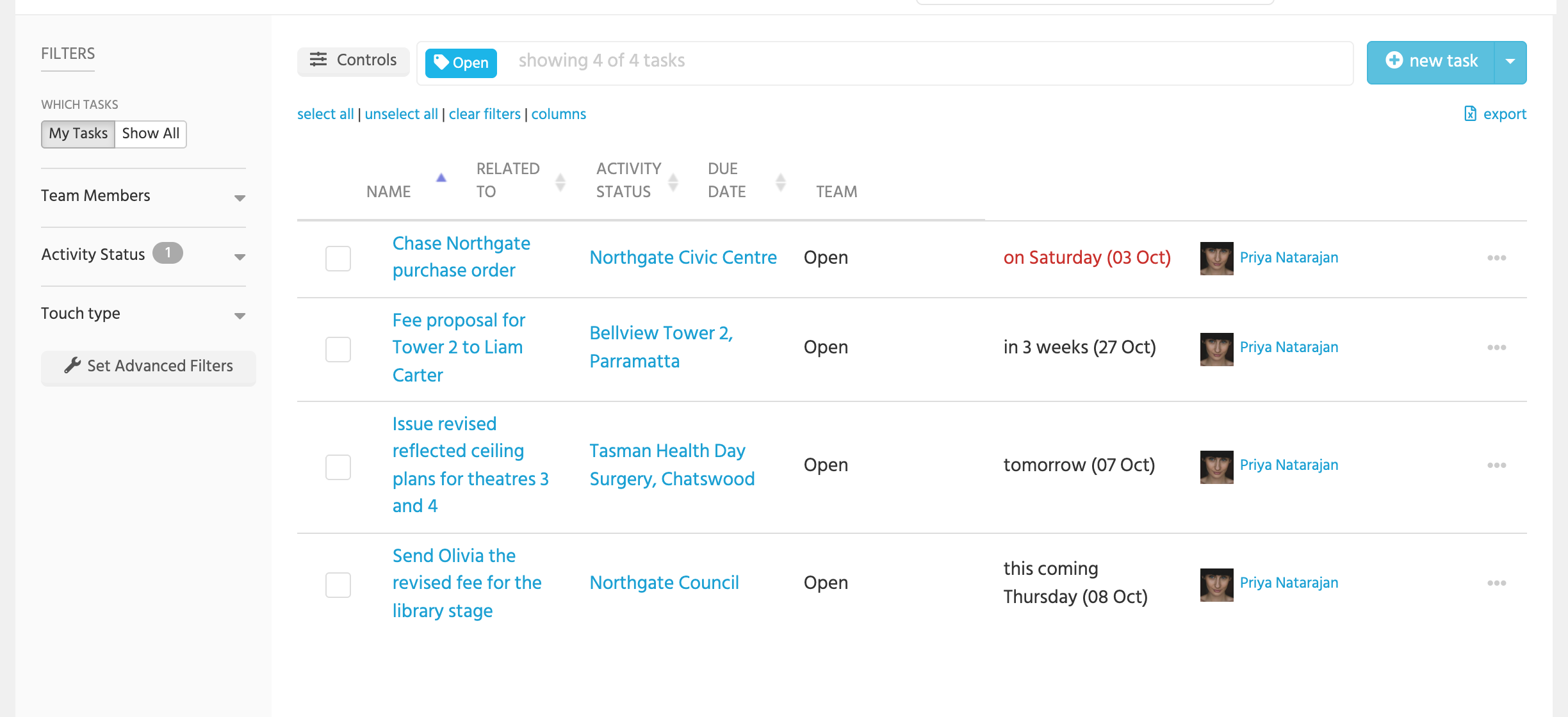
The Tasks view lists your open tasks, soonest due first, with filters for status, who completed them, and the record they're for. **Show All** widens it to the firm's.
A task has **Your task**, what to do; a **Due Date**; who it's **Assigned To**; and what it's **Related To**. It's **Open** until it's **Completed** or **Cancelled**.
Add one from:
* **new task** in the right-hand panel of any page;
* **+ Task** in a record's Meetings & Tasks panel, which fills in the record;
* **Add Task** in a row's menu on a table, or on a project's card on the board.
A task with no due date is given one a week ahead.
Open a task to see how it stands: *Due tomorrow*, *Overdue by 3 days*, *Due today*. **Complete** ticks it off, and **Cancel task** keeps it on record as not done. A completed or cancelled task stays on the record, in **History** in its Meetings & Tasks panel. A follow-up booked by a [relationship plan](/guides/everyday/relationship-plans.md) is an ordinary task: completing it opens the plan's log, and cancelling it counts as a skip.
## Meetings
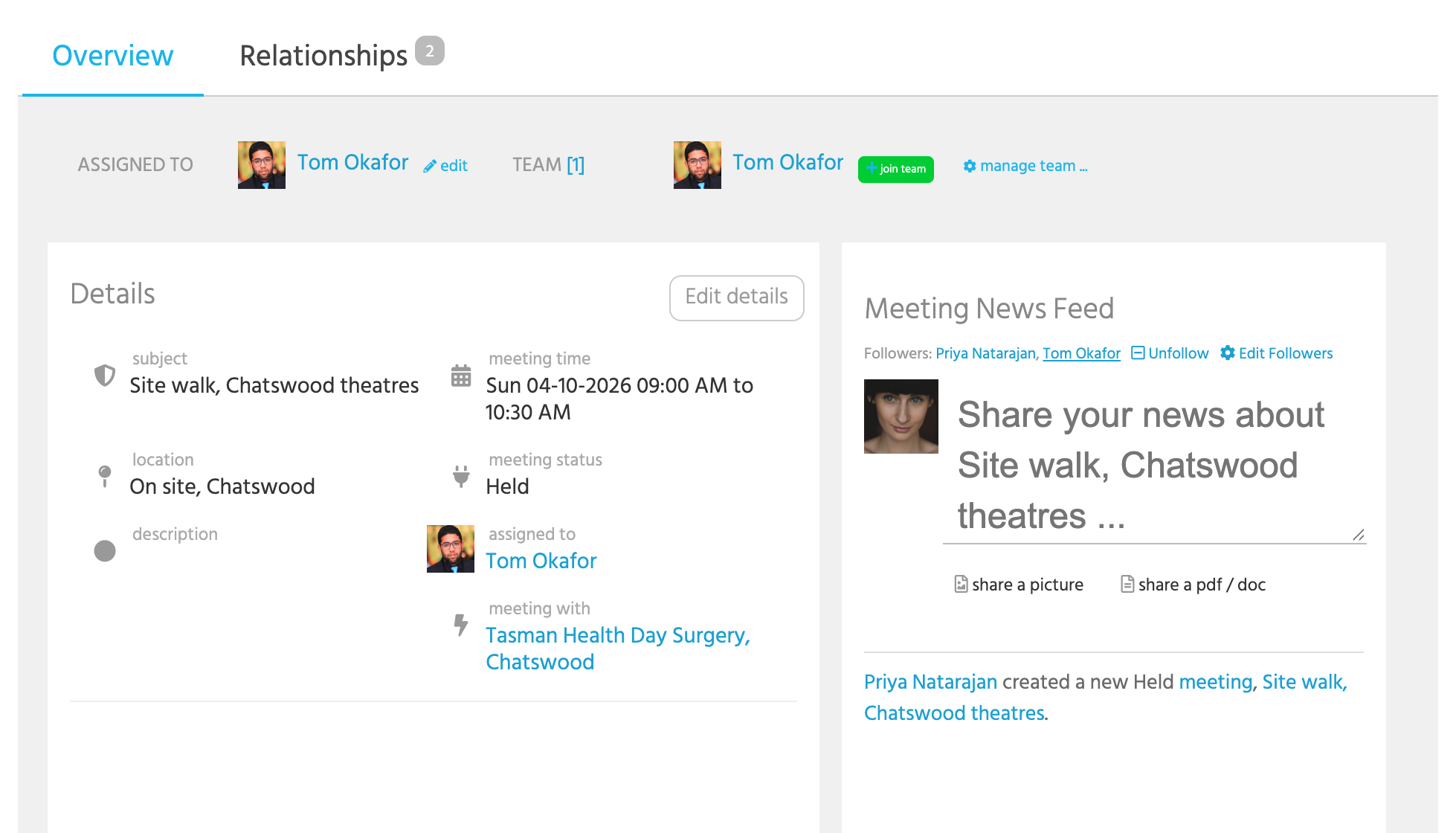
A meeting has a **Subject**, a **Meeting Time** from start to end, a **Location**, a **Description**, who it's **Assigned To**, who it's **Meeting With**, which is a company, a contact or a project, and the **Related Contacts** who'll be there. Team members can be on it too.
A meeting is **Planned** until it's **Held** or **Cancelled**. tiny+ marks a planned meeting held by itself the day after it ends, so your records stay right even if nobody comes back to it.
Write up what was said as a post on the meeting's news feed, or in its description. The **Meetings** section of a [scheduled report](/guides/reports/scheduled-reports.md) can list the meetings held without notes, so they're not forgotten.
**Download iCal** on a meeting's page puts it in your own calendar.
## Reminders
On the morning a task falls due, at 7am in your account's time zone, tiny+ reminds whoever is assigned to it and whoever created it: in the app, by email if your [notification setting](/guides/everyday/notifications-and-apps.md) allows, and as a push notification on your phone. Move a task to a later date and it's reminded again on the new date. There are no reminders for meetings.
## Coming Up
The News Feed opens with **Coming Up**: your tasks and events due in the next two days, overdue ones included. The tick completes a task; the cross deletes it.
## Elsewhere
* Your [Dashboard](/guides/everyday/for-me.md) has **My Upcoming Tasks**, **My Calendar**, and tiles for active and overdue tasks.
* **My Week** emails each person their week's tasks and meetings on Monday morning, and **Needs Attention** lists overdue tasks on Wednesday. See [Scheduled Reports](/guides/reports/scheduled-reports.md).
* Tasks, meetings and events go to your Outlook calendar when you've connected [Microsoft 365](/guides/integrations/contacts-and-calendar-sync.md).
* The [mobile apps](/guides/everyday/notifications-and-apps.md) list your tasks and meetings, and let you tick tasks off.
* **Reports** in the sub-menu has the starter reports: open tasks by person, overdue tasks, tasks completed this month, meetings this month and meetings coming up.
## Who can do what
* Everyone can add tasks and meetings on the records they can see.
* A task can be changed by the person it's for, whoever added it, and anyone on its team; a meeting by its owner, whoever added it, and anyone from your firm on it. Anyone else is told who can.
* Records Admins can change any task or meeting, and see the whole team's calendar.