> For the complete documentation index, see [llms.txt](https://docs.tiny.plus/llms.txt). Markdown versions of documentation pages are available by appending `.md` to page URLs; this page is available as [Markdown](https://docs.tiny.plus/guides/integrations/inbound-emails.md).
# Filing emails by BCC
Forward an email, or BCC it, to your own tiny+ address and a copy is kept against the contact.
Most of a relationship happens in email. tiny+ gives each person an address of their own: forward an email to it, or BCC it when you write to a client, and tiny+ keeps a copy against the contact, where the whole team can see it.
{% hint style="info" %}
An Account Admin switches the feature on first, under Account Settings -> Inbound Emails.
{% endhint %}
## Your address
Open **My Settings -> Inbound Emails** and press **Create new inbound email address**. The address is sixteen letters at *inbound.tiny.plus*. Save it in your mail app as a contact called *tiny+* so it's easy to pick.
When you make the address, **Accept emails from any address?** is off, which means tiny+ files only what comes from your own sign-in email. Leave it that way unless you forward from a different mailbox. With it on, anything sent to the address is filed, so keep the address to yourself.
## Filing an email
* **Writing to a contact**: add your tiny+ address as a BCC. The email is filed against the person in the To line.
* **An email you received**: forward it to your tiny+ address. The email is filed against the person who sent it.
tiny+ looks through the email for an address that matches a contact's email address, and links the email to the first contact it finds. Attachments aren't kept, and a long thread is trimmed to the newest reply. The same email arriving twice is filed once.
If no contact matches, the email is still kept, assigned to you, and you can find it through search or the Emails menu. Nothing bounces if an email can't be filed at all: check that you sent it from your sign-in address.
## Where filed emails appear
* On the contact's page, under the **Emails** tab, which appears once the contact has an email.
* On the contact's feed, as a post that you shared an email, so the team sees it.
* Through [search](/guides/everyday/search.md), which covers emails.
* Under the **Emails** menu, if your admin has switched it on: your emails, all emails, and a table.
Emails filed this way are linked to a contact. Emails logged by the [Outlook Add-in](/guides/integrations/outlook-add-in.md) or through the [API](/api/endpoints/emails.md) can be linked to a project or company as well, and show in the **Emails** panel on those pages.
{% hint style="warning" %}
A filed email can be read by everyone on the account. Don't file anything the whole firm shouldn't see.
{% endhint %}
## For Account Admins
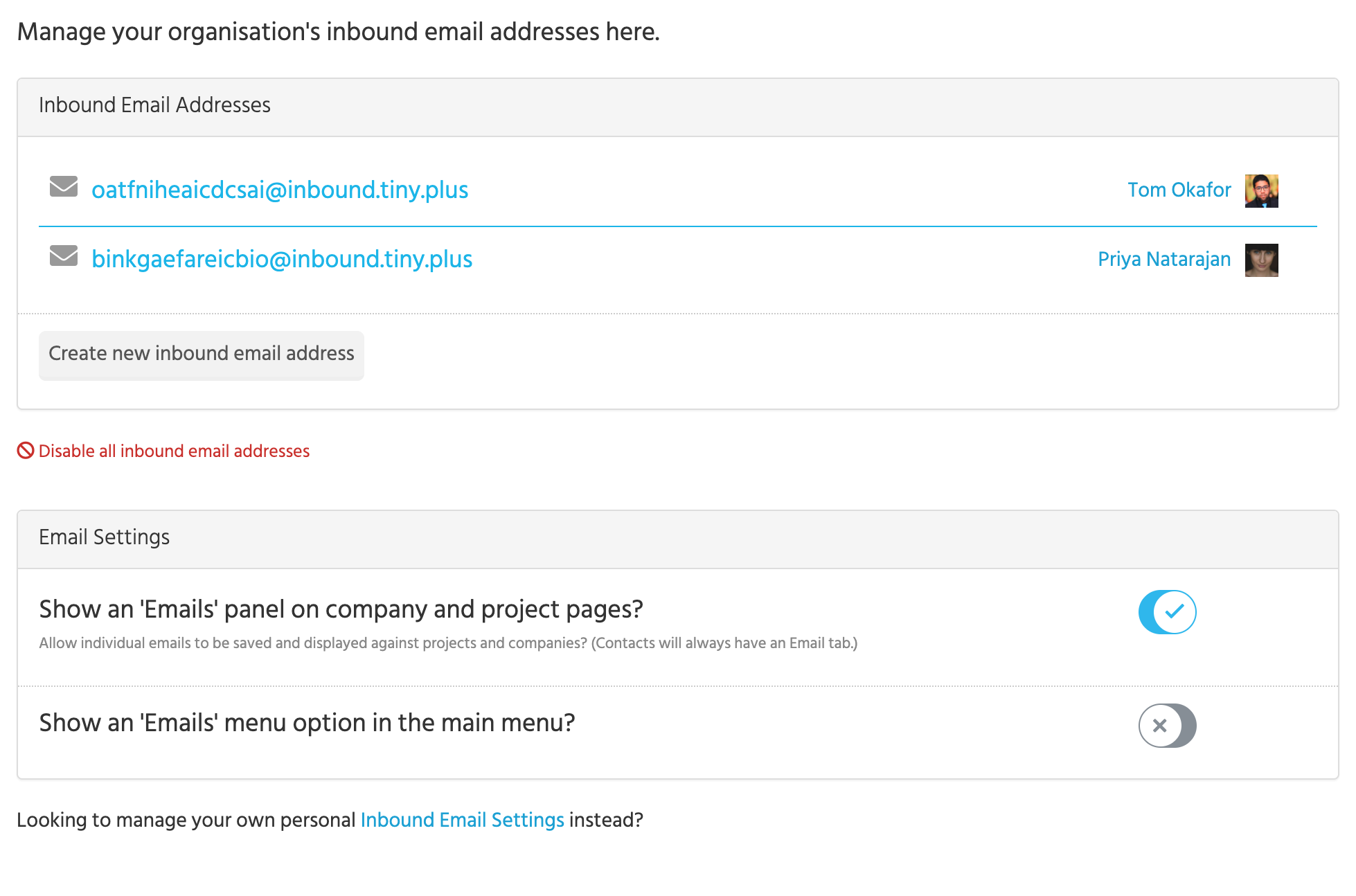
**Account Settings -> Inbound Emails** lists every address on the account and who it belongs to, and has the switches:
* **Set up Inbound Email BCC addresses** turns the feature on. Until then, nobody can make an address.
* **Show an 'Emails' panel on company and project pages?** adds the panel for emails linked to those records. Contacts always have their Emails tab.
* **Show an 'Emails' menu option in the main menu?** adds the Emails menu for everyone.
* **Disable all inbound email addresses** turns the feature off again. The addresses are kept, and anything sent to them is discarded until it's turned back on.